Azure Pentesting: Lifecycle, Misconfigurations & What Should Be Covered
A practitioner-led guide to Azure penetration testing, the real attack lifecycle, the common misconfigurations, and what a proper Azure security assessment covers.
Most Azure security assessments stop at the perimeter. A real penetration tester starts where a real attacker starts: with the identity layer, the overprivileged service principals, and the misconfigured role assignments that almost every Azure tenant has accumulated without knowing it.
Far from the traditional penetration test, this is the attack lifecycle as it actually plays out in a live Azure environment, from initial access to full tenant compromise.
What Azure Penetration Testing Actually Involves
An Azure penetration test is not a vulnerability scan. A scan identifies known CVEs and configuration issues against a checklist. Neither is it a configuration assessment. A penetration test simulates what a motivated attacker would do, the chain of actions from initial access through lateral movement to the objective.
In Azure, that chain almost always runs through identity and access management. Microsoft Entra ID (formerly Azure AD) directory, service principals, role assignments, Conditional Access policies, these are the attack surface that matters.
What a professional Azure penetration test covers:
- External reconnaissance: what can an attacker find about your Azure tenant and subscription without credentials
- Initial access: phishing, credential stuffing, token theft, compromised identities or resources
- Enumeration: mapping the tenant's users, groups, applications, and role assignments
- Privilege escalation: identifying paths from a low-privileged account to administrative control
- Lateral movement: pivoting across subscriptions, resource groups, and connected services
- Persistence: establishing access that survives credential rotation and account remediation
- Detection evasion: how attackers avoid triggering Azure Sentinel and Defender for Cloud alerts
The Most Common Azure Misconfigurations We Find in Real Engagements
After running Azure security assessments across enterprise environments in the GCC and beyond, the same issues appear in almost every engagement, not because organizations are careless, but because Azure's complexity makes these mistakes easy to make and hard to notice.
Over-privileged service principals: A service principal with Contributor access was created for a deployment pipeline three years ago. The project ended but the service principal didn't and it has never been rotated. An attacker who finds that credential, through a leaked .env file, a compromised developer laptop, a public GitHub repository, has immediate, broad access to that Azure subscription.
Stale guest accounts: External contractors, partner organizations, legacy integrations. Azure's default guest account permissions allow enumeration of the directory. An attacker can map your entire tenant structure from a single compromised guest account.
Overly permissive Conditional Access policies: Most organizations configure Conditional Access for their primary user population and leave gaps. Legacy authentication protocols, service accounts, specific application exclusions. Each gap is a potential entry point.
Public storage blobs: Although this is becoming less common, Azure Storage accounts with containers set to anonymous read access are often left over from a development or testing phase. These frequently contain configuration files, application logs, or backup data.
Misconfigured Azure Kubernetes Service and Container Services: Often with overprivileged managed identities, exposed Kubernetes API servers, cluster roles that grant more access than the workload needs.
The Azure Attack Lifecycle: From Initial Access to Privilege Escalation
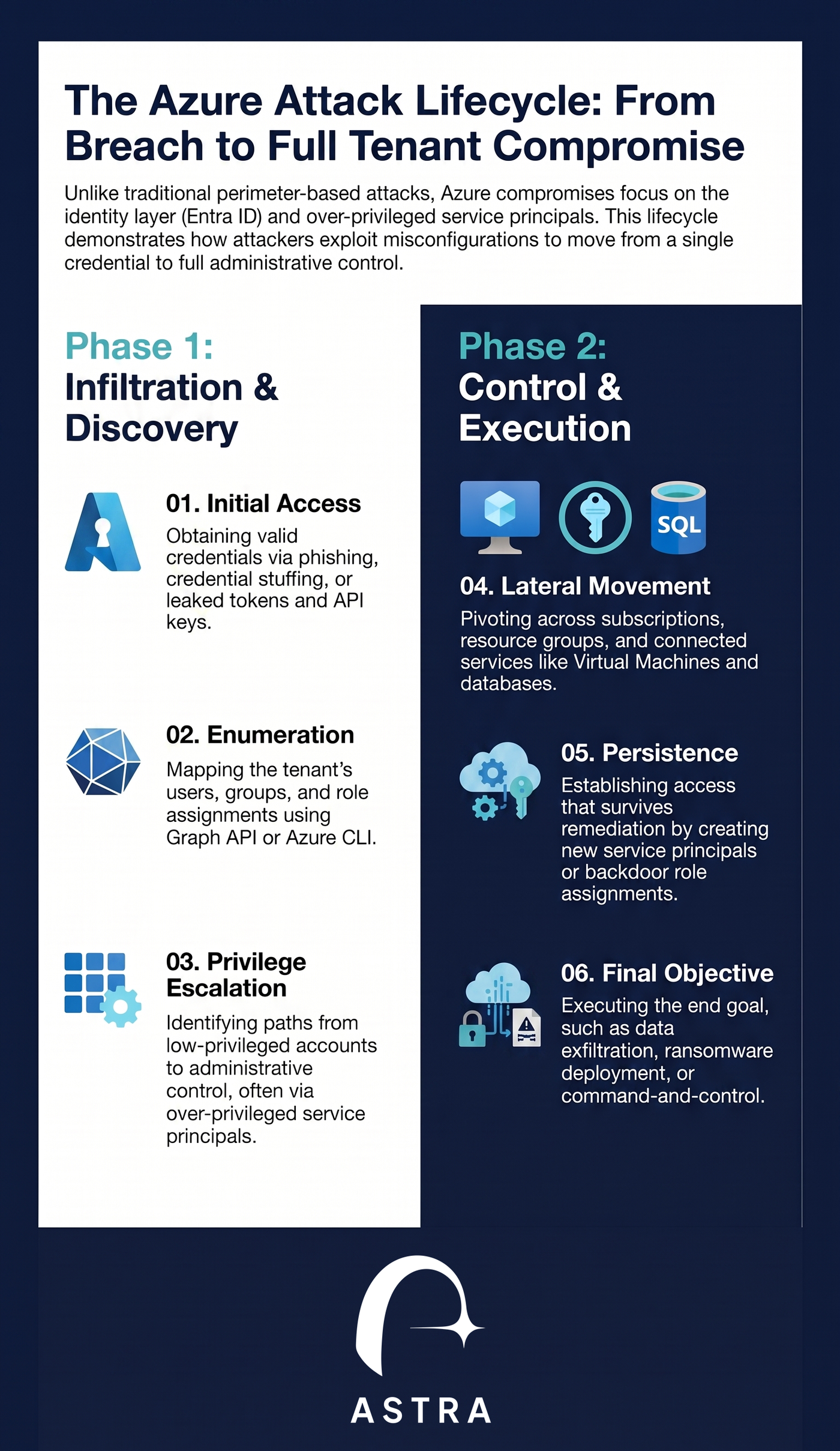
Here is how a real Azure environment gets compromised, step by step, without a zero-day in sight.
Step 1 – Initial access. The attacker obtains valid credentials. This happens through phishing (most common), through a leaked token or API key in a public repository, or through credential stuffing against Microsoft login endpoints. Multi-factor authentication significantly raises the bar here. But MFA gaps, legacy authentication bypass, and device compliance exceptions are common.
Step 2 – Enumeration. With valid credentials, the attacker maps the environment. Azure CLI, Microsoft Graph API, and PowerShell Az module commands reveal users, groups, role assignments, subscriptions, and connected applications. In a misconfigured environment, even a low-privileged user can enumerate significant portions of the tenant.
Step 3 – Privilege escalation. The attacker identifies an over-privileged service principal, a Contributor role assignment on a sensitive resource group, or an Owner assignment that was never removed after a one-off project. From there, the path to Global Administrator or Subscription Owner access is often a matter of executing a series of straightforward commands.
Step 4 – Lateral movement. Within a subscription, the attacker pivots from one resource group to another, accesses connected Azure services, potentially crosses into Azure Virtual Machines, databases, or Key Vault secrets. With Global Reader or Contributor access, this movement is difficult to distinguish from legitimate administrative activity.
Step 5 – Persistence. The attacker creates new service principals, adds credentials to existing applications, or plants backdoor role assignments that survive password resets and user account remediation.
Step 6 – Objective. Data exfiltration. Ransomware deployment. Command and control infrastructure. Access sold to a third party. The objective depends on the attacker — but the path to reach it is largely the same.
What a Professional Azure Security Assessment Should Cover
A professional Azure penetration test should go beyond automated scanning and deliver:
- Manual review of Entra ID configuration, role assignments, and Conditional Access policies
- Service principal audit: all principals, their assigned roles, credential age, and last activity
- External attack surface assessment: what is accessible without credentials, what can be discovered through OSINT
- Privilege escalation path mapping: documented paths from any authenticated user to administrative control
- Detection gap analysis: which of the tested attack paths would trigger an alert, and which would not
- Clear, actionable findings with risk ratings tied to your actual environment — not CVSS scores applied in a vacuum
How to Prepare Your Azure Environment for a Penetration Test
The goal of preparation is not to pass the test, it is to make the test useful. Hardening before a penetration test removes findings that you already know about. The test should reveal what you don't know. Useful preparation steps:
- Document your Azure architecture: subscriptions, tenants, resource groups, critical workloads
- Define the scope clearly: which subscriptions, which services, which attack vectors are in scope
- Establish a communication channel with your security and infrastructure teams for the test period
- Ensure logging is active: Azure Monitor, Defender for Cloud, Sentinel if applicable
- Brief your SOC team: they should know a test is running, so genuine incidents don't get buried
How Can Astra Help
Astra customers can use the built in use cases to identify any identities vulnerable to threat actors tactics and techniques.
Contact us for inquiries or a demo https://astrasec.io/#cta